Monday, May 6, 2013

Apps for Conferences

I am attending Connect 2013 tomorrow in Niagara Falls, ON., and am looking forward to learning and networking. This will be the first conference I attend with my iPad, and I'd like to make sure I use it to its full ability. What is important at a conference? Taking notes, networking, gathering information and staying connected. I have done a little research and read some reviews, so here is my list of must have apps for any education conference:

Scans business cards and connects with LinkedIn
I am also debating using a mind mapping app, and am trying to decide between  http://www.inspiration.com/ipad and http://www.ithoughts.co.uk/iThoughtsHD/Welcome.html
. I used Blogsy to create this post, still learning the ropes. I have attempted to link images but am not sure how yet. Very cool app so far. My guess is it can do way more than I know as of yet. There are excellent how-to videos on the website which I will have to look at more closely.
Looking forward to tomorrow and testing out my new apps!

Tuesday, February 5, 2013

Boardmaker Share

Today, I was making visual supports for one of our service recipients- 12 year old girl who is having difficulty independently completing her shower routine. Her caregiver said that steps are often being skipped.

I was making her at schedule related to showering and I found an AMAZING resource for those working with BoardMaker. It is called Boardmaker Share and users upload their boards/templates there and you can download them and open them with the Boardmaker program on your computer and the CUSTOMIZE and edit them just as if you had created them from scratch. You have to register but it is quick and easy.

So I searched "Shower" and found some great boards that others has already made. I found one that I liked and edited to meet the specific needs of the individual I was creating it for. What a time saver! This is a great tool for teachers, Instrutional Therapists and parents. If you already have BoardMaker, I recommend using this site :)

It is a great way to save some time and collaborate with others.

Sunday, February 3, 2013

Respite Ideas!

As part of my placement  I am creating a list of ideas/activities for respite workers to do with their service recipients . One of the common questions that my supervisor gets in regards to working with respite care participants is what activities can they do together that are LOW COST and FUN. I have created a pinterest board that I hope helps people find creative, fun and enjoyable activities.

I hope that this pinterest board can be an inspiration for those working with individuals with special needs. I am planning on becoming a respite worker-likely with individuals who have Autism Spectrum Disorder.

For those who are wondering, respite work is described as "planned short-term and time-limited breaks for families and other unpaid caregivers of children with a developmental delay and adults with an intellectual disability in order to support and maintain the primary care giving relationship."

Aside from just being a "break" for the primarily caregivers, respite care should also be an enjoyable and can  be a learning experience for the person receiving the care. Hopefully my list helps create a more enjoyable experience for both the caregiver and the individual receiving care!

Calm Down Bottle--

Monday, January 21, 2013

Social Narratives

I have just competed the Social Narratives Module from autisminternetmodules.org. Such a great learning tool! I wanted to share a bit of what I learned but I STRONGLY recommend you check out the modules yourself.

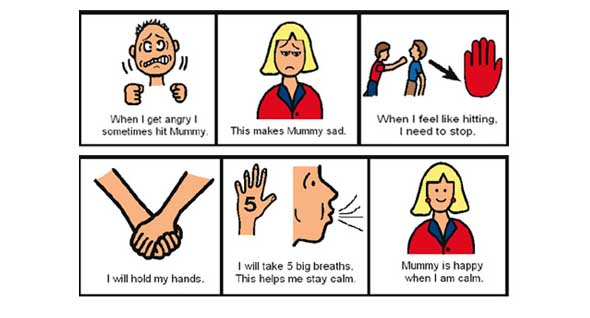
A daily challenge for Individuals with Autism Spectrum Disorder (ASD) may be difficulty with social interactions. Social narratives are designed by parents and educators to help enhance social functioning for individuals with ASD.  Social narratives are visually represented stories that describe social situations and socially appropriate responses or behaviors to help individuals with ASD acquire and use appropriate social skills.
Image Source: speechbuddy.com
Social skills include communication, problem-solving, decision-making, self-management, and peer relations abilities.

When can social narratives be used?
-after a social "error" has occurred (making a rude comment to a peer, hitting, scratching)
-before a new experience or transition (going to get a hair cut, changing schools, meeting a new teacher)
-as an intervention to reduce an already reoccurring behaviour (interrupting classmates, shouting out in class, picking nose)

The module lists specific steps which must be taken to ensure a social narrative is effective.  A neat way to create a social narrative is using PowerPoint and depending on the individuals needs you can add speech so that along with reasing the story, the individual can hear the story.

As part of my placement at REACH, my supervisor said we will will be creating some social stories for a few clients. Looking forward to learning more about social stories and creating some of my own!

Friday, January 18, 2013

Autism Internet Modules

Today, I was introduced to a great resource for anyone working with indivduals with autism. It is was Autism Internet Module and can be found at: http://www.autisminternetmodules.org/

Once you create an account, you can access information for free, under various categories such as: Recognizing Autism, Infants and Toddlers with Autism, Autism at Home, Autism in the Classroom, autism in the Community and Autism in teh Workplace.  Each category has several online workshops that range from an hour to two hours.

This is a great resource for any one working with indivduals with autims or even for parents of children with Autims. The best part conent is FREE. You can buy credits to print certficates if you choose.

I am looking forwad to completing some of the modules :)

Tuesday, January 15, 2013

Guided Observation: Intensive Behaviour Intervention

Today, I had the opportunity to do a guided observation during a Intensive Behaviour Intervention. Commonly referred to as IBI, Intensive Behaviour Interventions are described as the application of ABA principals in an intensive setting (minimum 25 hour per week) with goal of seeing a change or improvement in behaviour.

KidsAbility describes IBI using the following criteria:
  • Uses systematic behavioural teaching methods
  • Has clearly defined strategies & goals;
  • Is individualized to the needs of each child
  • Incorporates changes based upon direct measurement of each child's learning'
  • Teaches children one-on-one or in small groups.

It was really NEAT to finally see an IBI session in person after reading so much about it the last few months. Wow, do Instructor Therapists (IT) work hard! The session that I observed was with a individual who I will call "Simon". Simon was a active little boy with a lot of sensory issues. he loved to pinch because he enjoyed the sensation, as a strategy, the IT used a squishy pillow. Simon's behaviour was reinforced when Simon squeezed the pillow.

"Simon" was non-verbal so he used PECS (Picture Exchange Communication System)  and approximations as his functional communication system. Examples of some of the behaviours that were being reinforced were eye contact, sitting in his chair and squeezing his pillow toy. Some of the skills being taught were related to identifying pictures of family members, identifying colours and identifying body parts. It was really interesting to watch but a bit overwhelming as well. So much to learn!

I am hoping to see a couple more sessions before the end of my placement at REACH.

Autism Spectrum Disorder (ASD), Special Education, Placement, Intensive Behaviour Interventions

Friday, September 7, 2012

Autism and Behaviour Science

This week I am starting a post grad Certificate in Autism and Behaviour Sciences. It is an online course through Algonquin College. I have taken online courses before, but never full-time  so I am not sure exactly what to expect. I think I will miss face-to-face interactions. That was one of my favorite parts of the past year, taking my Bachelors of Education (and undergrad).

First semester I will be taking five courses including:
  • Autism - Introduction to Applied Spectrum Disorder (ASD)
  • Introduction to Applied Behavioural Analysis
  • Parent and Staff Training
  • Working With Families and Teams
  • Ethics and Professionalism
In January I will do a placement for four weeks. There are a few different types of placements which you can have, including ASD Agencies, IBI settings, School Placements and School Support programs.
I am hoping to be in a school setting and I know a few autism classes in the area. I will be exploring my options. There are two placements so I am hoping to have a range of experiences. We have to set up our own placements which is one of the unique challenges for a Distance Ed program.
It is a standard program, so course and expectations are the same at all the schools the program is offered in. I considered going to Mohawk and they seemed to be really great about answering questions, so it is worth looking into if anyone is interested in the program and located in the Hamilton area. Ontario Colleges would have a list of all schools that offer it.

Monday, March 5, 2012

Hands-on Science Robots and Ferris Wheels

As of late, I have been busy finishing my courses at Brock and planning for my placement in a grade eight classroom so I have not had much time to post. I'm not neglecting you!

Today, one of the grade eights made this great robot out of Lego that I wanted to share. It walks backwards and forwards using gears and a battery pack. Very cool! He could even make it dance. Mr. Roboto here was made just for fun after one student completed the given task.


 It was amazing to see what the students came up with given an open ended task during the systems in action unit in science. Students were asked to use Lego to create a carnival ride using gears and pulleys. Hands on learning is a really powerful experience for both students and teachers. The students were engaged and learning through problem solving. It was amazing to see what students could come up with. Each was unique and different in their own way. I will share more pictures of the final products if I can get a hold of them. Inspiring!

All Hands in.


Wednesday, January 25, 2012

My Leadership Philosophy

Personal Philosophy
For the last few weeks, I have been considering my own personal leadership philosophy. I think my personal philosophy aligns most closely with Participative Leadership. It is important to me that the decision making processes of the group are considered and valued. By engaging all stakeholders in the decision making process, I believe it increases the school effectiveness. This approach gives members of a school community ownership and pride in the school, helping to create a better place for learning to take place.

Making it Meaningful
I have been working on creating my own personal mission statement. I wanted to ensure that my mission statemnet really meant something to me and that it was both authentic and meaningful. It was important for me to remind myself when creating this that it needed to include specific actions that I will take. I need to decide exactly what to do in order to work towards accomplishing my goals. The following is my working mission statement. I have chosen to share it because I think that makes me more accountable.

Personal Mission Statement:
"As a edtech teacher leader I seek to use the participative/distributed approach to leadership because I value the input of all stakeholders. I will support the development of the organization by fostering collaborative processes through social networking sites, specifically those with a focus on education. I will work on modeling a positive attitude to aid in promoting an enjoyable and productive work environment and school culture. In the classroom, I will try varied methods of delivering instruction with a focus on technology integration. I will reflect upon and share these experiences with my colleagues both in the school setting and online using my blog and other social media outlets. I will adapt my practice in response to feedback received as a result of these reflections"

I am open to suggestions and comments, please feel free to share!

Monday, January 23, 2012

In our cohort class we looked at case study 11.1, called "The Discouraging Grade" from the book, Case Studies:
This case study was found on page 87-88.

Case study resources:

Differentiation-Teaching, Learning and Leadership
http://www.scoop.it/t/differentiation-teaching-learning-leadership

Survive and Thrive-  Virtual Conference for Begging Teachers
http://www.survivethrive.on.ca/

Teacher Relationships


Sunday, January 22, 2012

Teachers as Leaders

It can be very difficult to define what it means to be a leader. There are several definitions of leadership I have been considering in the last week or so but the one that has the most meaning to me is the following:

"By leadership, I mean influencing others’ actions in achieving desirable ends. Leaders are people who shape the goals, motivations, and actions of others. Frequently they initiate change to reach existing and new goals." - (Cuban 1988)

The question then is how can teachers influence other teachers in achieving desirable ends. I think that an important way teachers can do this is by taking time to teach other educators how to use different tools, strategies and methods in the classroom. 

For example, I am currently working on a presentation for my Methods class in how to use LiveBinders for our own culminating task. We have all been working since September to build a Teacher Candidate Handbook which was divided into two categories, curricular and extracurricular which we subdivided into topics such as: community building, assemblies, tech tools, DPA and many more.  We all worked on them individually. Some of us used paper and pen, some used Google Docs and some used Word programs on their computer but what we want now is to put them together so that we can share the information with our entire class. We each only worked on two sections but we want to see all of it since we have all collaborated. A fellow classmate and I volunteered to help the class set it up on LiveBinders even though neither of us have used the tool in THIS way.  Setting it up included making the accounts and preparing a half hour presentation which would help show our class how to use it themselves. In this way we created a Professional Development presentation as well a solution to our culminating unit issue. Even though we were both familiar with the program, figuring out how we could use it for this project and deciding how to teach our colleagues was a whole other manner. 

We have been working on our PD presentation for a few days now and it is coming together. By teaching our class how to use this tool, we are not only helping them complete a project but also teaching them a tool they can use as teachers. LiveBinder is GREAT for organizing resources and you can even use it with a class, similar to how we are. Preparing this does take extra time but I think it is important because it helps our class move towards our common goal.

Preparing this presentation really made me think about what it means to be a leader when it comes to using technology in education. Even though I am nervous to present because I definitely do not know everything about this tool nor have I used it in this way, I am taking the risk because I think this information is important to share. It will help us reach our common goal and can provide a tool to support a class of future educators in the future. Many of you are likely already teacher leaders and you don't even know it!


 If you haven't checked out LiveBinders before, I suggest you do. You can use it just like you would real binders but it is all online. It is a way to organize links, word documents and images all in one place-public or private. There are also lots of resources available because people have made binders and chosen to share them. For example, here is a LiveBinder that has many different links to SmartBoard resource sharing sites. 

Wednesday, January 18, 2012

What should a 21st century classroom look like?


I went to the Queens Conference on Education last weekend in Kingston and in the opening activity we were asked to write a list of words that described a 21st century learner and a 21st century educator.  I found this comforting because the day before in a Tech Ed. leadership class at Brock we were asked the question, what should a 21st Century classroom look like? In addition, another one of my classes we created a new teacher handbook and I was responsible for the section on tech tools. With others, I am collaborating to provide examples of helpful tools for new teachers, as well as attempting to answer the question, How can tech tools help to support 21st century learning skills?

We are all asking the same question. What I am finding is there are many answers and many more ways to organize your answer. At the conference we left it at a short list of five words and moved on to individual workshops that attempted to address this and other compelling issues in education. In Ed. tech class we used Google docs to collaborate a list of words to describe the cultural, physical, academic and technical aspects of the 21st century classroom. From there we found links to support or explain those words and concepts. In the handbook, I tried to sum up what I knew on the topic into only one page.

There are many ways to answer this question but what I find most helpful is seeing and hearing about teacher’s examples that they are using in the classroom. I use sites such as Pinterest, Livebinder and Twitter because they are rich with examples of 21st century lessons and ideas. Of course, one must discriminate between what will work for them and what will not, but also they must decide what really supports his/her vision of a 21st century classroom. I have set my own goal which is to work on really contributing to these sharing communities in the coming months. I want to upload my own lessons and make my own collections that I can share.

-Rachel 

Saturday, November 26, 2011

Reflection

I have really enjoyed creating my own professional blog as well as my sample classroom blog. Through creating them, I have learned a lot about my personal teaching philosophy. I especially like the connections I have made because of my blog and twitter accounts. I feel they have helped me expand my PLN and will continue to in the future.  I really enjoy working with other professionals through collaboration. It has been a great resource! Seeing what others are doing in their classrooms has been very helpful, encouraging, and inspiring.

Creating my learning object was a good experience and I am happy I have had many chances to use it with my class. The informal feedback I have gotten from my associate teacher and the students has been encouraging. I will certainly use a learning object like this is the future, as it is so easy to adapt to various subjects and grade levels.

In the creation of this blog, I have learned how to embed videos, create slide-shows, link to web-pages and create new pages. I have also learned how classroom blogs can be used as a means to connect with and communicate with parents.

I feel like my blog has a long way to go, but I see it as a working document; always changing and evolving. Because of the PLN I have created, I have many example of online education portfolios which inspire me. I will continue to work on my blog and my online contribution to the educational world. Please check back in the future! I imagine you will see quite a change.

Monday, October 10, 2011

I have now had my first days of observation at my placement school. I am placed in a grade 5 class at Mount Albion Elementary School. I had a great first few days and I took some pictures to share.
My associate teacher is working to encourage co-operation and group work with the way her classroom is set up. This of course is accompanied by carefully planned lessons and activities. The students do not have assigned seats but instead, can choose to sit at any of the seating areas that she has set up. She has a combination of chairs, stools and carpets areas that the students can choose from.
In addition there is a larger carpeted area where the students gather for class discussions and lessons. The students have been promised by their teacher that she will not have them listening at the carpet for more than 15 minutes at a time. The switch between teacher directed and student directed learning keeps the students engaged and active in constructing their learning.
Around the room, one can find math mulipuatives and a library area organized by genre.
This set-up allows for students to participate in group work with different individuals at different times for different activities. The students seem to enjoy working in groups and best of all they are learning lots of information in meaningful ways. She sure has done a great job of making this small porta-pack room invinting and educational for her students!

Tuesday, September 20, 2011

Dream come true for an internet lover!

I made the mistake tonight of setting up my reading area right next to my twenty inch computer monitor. It certainly made it difficult to concentrate! The whole time, all I wanted to do was go on the internet to check my twitter, read some blogs, explore these webquests, google stuff, find an excuse to make a glog/figure out what that was, maybe check facebook, youtube a favourite song and read some articles about how teachers were using tech. Really anything online seemed much more appealing than what I was doing! And this is not because I don’t like reading or what I was reading, I just really, really like using the computer and the internet. This is not new for me, I have always loved the internet and I have always been a fairly early adapter to new tech tools. I mostly like free things and things that help me explore the internet but I never really focused my joy of all thing web on anything specific An example of my often misdirected addiction, I had one follower on twitter for an entire year and I still used it. ONE! (that really makes it quite pointless and I don’t recommend it by the way) but I was determined to figure out what all the (nerdy) fuss was about. Eventually it caught on and here we are, using it to become better educators. That makes me really happy. But I often thought of my love for the internet as just a hobby and in my younger years was more or less discouraged in my house, especially during the dark, dark days of dial up because it tied up the phone lines (not to mention was incredibly slow). I liked the internet and I have always seen its incredible potential as a personal tool but I didn’t really expand that to think about how I really use it. I actually have taken some technology and education courses in the past but it still seemed really far off to use these technologies in the classroom, but now I see people are using tech tools in their classrooms! It is happening, people. And the best part is I can even see me using them! I loving having a reason to obsess over and check out online tools. Tech tools will help me be a better teacher and they can help your students learn more effectively. Oh, and they are fun :) It can be overwhelming because there is a lot out there, and I can tell that some of my fellow classmates feel like they might have already had too much. The thing is we are getting a lot of information right now and it is an opportunity for incredible growth and experimentation but when it comes done to it, we are the ones planning our lessons and it is up to us to decide what we like and what works for us. My challenge will be using these things in front of a classroom and stepping out of my comfort zone. It will be difficult teaching with a technology that you haven’t really seen modeled very much but I am hoping that we can find a balance between trying new things and doing that which is natural to us.

Test! Test! Test!

I am doing this for school. Learning how to imbed slide shows from Sliderocket.com

Monday, September 12, 2011

Blog Design

I have had a few questions about how to change your blog template to something different than the ones provided in Blogger.

I would like to provide you with a full tutorial but I am still very new to this and I would be afraid that I would be misleading. What I will do is offer a few links to sites that I found offering free templates for your blog.

For this template, I used eblogtemplates.com. The site offers free blog templates for Blogger and WordPress. Make sure that you read the comments before you download. If people are having a lot of unresolved problems then you might wish to choose another one. Often though, users or the site manager will leave comments that will help you fix any issues that you are having when changing your template.

http://www.bloggerthemes.net/ has some nice ones but I didn't actually use this one yet. I did read a few of the comments and users were being directed to read the txt document that comes along with the download. Many designers create these to help users install their templates.

I love the designs featured on Smitten Blog Designs. I haven't tried any of them out yet but you will notice on the side that they have easy instructions for use.

It took me a long time to get my blog fully functioning, but it was pretty easy once I read the comments and made minor changes to the html. Looking now at other sites, I may have picked a more confusing one. Some of them come naturally without ads but I had to remove mine on my own.

Look around, have fun and be patient!
Please let me know how it goes or if you find any good resources on template designs.

Saturday, September 3, 2011

On blogs and learning to accept the "imperfect"

Although this is my second blog, I am still very new to blogging. Upon creating this blog, my first blog was only a few weeks old and I still was unsure about many aspects. I easily created the account and set up the blog but I had difficulty understanding the customization features and how to create a blog that I felt represented what I wanted to say. This frustrated me and is what has held me back in the past. I was nervous about creating a blog that didn't look, function and read exactly the way that I wanted it to. In short, I wanted the "perfect" blog or nothing at all.

But starting the Tech Ed. course helped me push past that because whether my blog was perfect or not, I am expected to have one. And that both excited and terrified me. So I have been doing some exploring and learning. Tonight, I learned how to download a template from a free site and upload it to my blog, I learned how to edit the HTML to take out the ad boxes that came with the template and I learned how to change my URL and blog name. And as I did it , I thought "I should blog about this!" which isn't yet a natural thought for me.

But what I am learning is that creating a blog that is "perfect" isn't really possible. It is a learning process like anything else and  the more time we spend at it, the better our blogs will be and they will start to represent what we want them to. People aren't born bloggers just like they aren't born readers, writers, mathematicians or scientists! That will be our job as teachers, to help students learn these skills.

So as we start off this year, I am looking forward to learning how we can help our students, through technology and other means to be successful learners just as I am learning how to be a successful teacher (and blogger!)

Tuesday, August 23, 2011

Welcome!

Hello there! My name is Rachel Krueger and I'm a 23 year old teacher candidate in Brock University's Bachelor of Education program. I like music, arts and crafts, reading, and modern technology. As someone with a keen interest in today's technology and a passion for educating, the Ed. Tech program seemed like a perfect fit.


I am starting this blog to use as my digital portfolio for my work done in the Ed. Tech program. Classes start next week at which time I believe I will be getting more information on the type of work that will be displayed here. Wish me luck on the beginning of my journey and stay tuned for more updates. 


Thanks for reading!


-Rachel